This help page describes in detail four mechanisms for selling gold on BullionVault.
Or try to trade at a better price by patiently offering attractive prices to others
| Step 1. less detail |
Make sure you are logged in. Press ACCOUNT and then click the BALANCE sub-menu option. |
| Step 2. less detail |
You will see your
available gold balance in a gold line. Click on
the 'Sell for...' drop down list, and click the currency you want to
get for your gold. The order panel will be loaded assuming the sale of all of the available balance in the vault you selected. In a market where other people are currently quoting prices the price and the approximate order value will be set for you at reasonable values. If these are not loaded there is no current price quoted by buyers, and you will need to decide your price, so skip to Step 5. No gold available? You cannot proceed yet. You can only sell gold you own. If you need to cancel previous sale orders to release their reserved gold go to HISTORY ORDERS select an open sale order and from the order panel and KILL ORDER . |
| Step 3. less detail |
Adjust your Price per kg and/or the Quantity (kg) as required. |
| Step 4. less detail |
When you're happy with your order press the SELL/OFFER button, and CONFIRM , as for a normal order entry. Then look below for what happens next. |
In a market where there are no prices being bid the order panel will not choose a price for you. You must then choose, and a good way is to go to see the other market prices on the order board.
| Step 5. less detail |
To see other market prices click on the MARKET button, and click the ORDER BOARD sub-menu option. Your order panel will still contain your chosen vault and currency and now you will see other prices. Now choose your Price per kg and Quantity as required. |
| Step 6. less detail |
When you're happy with your order press the SELL/OFFER button, and CONFIRM , as for a normal order entry. Then look below for what happens next. |
This is a different style of buying and selling. Suppose you are indifferent to the location you store gold in. You might buy it when someone offers gold cheaper, and sell it when someone bids up. Or perhaps you like to buy when there's a hint that the gold price is going up, while you're monitoring a real-time gold chart.
The order board lets you watch and grab available opportunities as they arise. To do this you'll need both quick reactions and available resources. You'll need available currency when you wish to buy, and available gold in any vault you wish to sell from. Otherwise your patience will only be rewarded with an 'insufficient funds' error when your order is submitted!
| Step 1. | Make sure you are logged in. Press MARKETS and then click the ORDER BOARD sub-menu option. |
| Step 2. | You can choose to apply a filter. If you like to trade in US Dollars then apply the US Dollar filter. Do this by selecting US Dollars from the currency drop down list on the upper left hand side of the screen. You can also filter the vaults if you want to. You will now be able to focus on the prices and vaults you're interested in. |
| Step 3. | You might also choose to get a live price chart monitor running. Lots of gold prices from all over the world are fed into BullionVault's real-time price charts. These can give you a sniff of a potentially rising market and may offer a pattern which you think indicates a buying signal. |
| Step 4. | Now watch. Your order board screen will refresh itself every few seconds, or when you press the GO  button. |
| Step 5. | Spotted an opportunity? The race is on! Click the gold brick (or the green one), and the system will load what you've clicked straight into the order panel. Then press the BUY/BID (or SELL/OFFER ) , check and CONFIRM . Then look below for what happens next. |
Here's another way for the predatory trader to get to work. You might see the US Dollar price rising in Zurich and falling in London. It might be something fundamental, but then again it might just be a buyer bidding up for Zurich gold, and no local seller, while a seller is offering cheap bullion in London, with no local buyer. That's an opportunity for those with the courage and resources to take a quick profit by selling into Switzerland and buying from London. Take care though! You are now moving into areas of trader's risk. It's possible that you'll only get one side of your trade done.

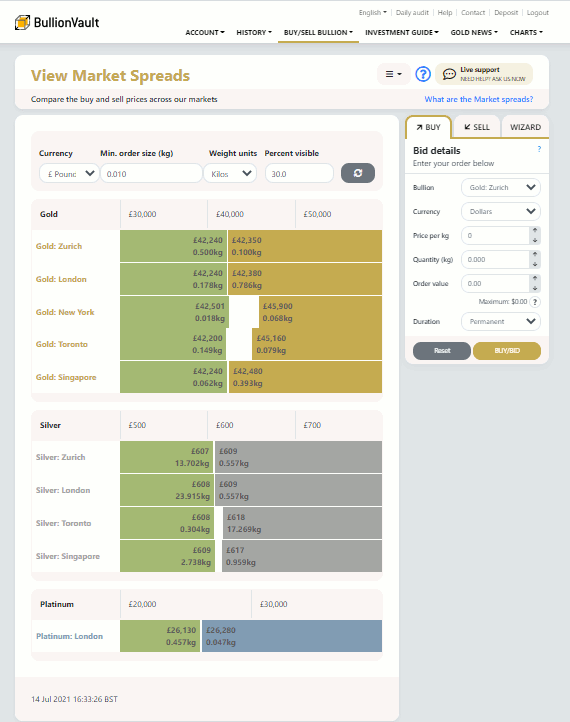
The Market Spread helps show this type of opportunity and gives you the opportunity to respond quickly.
| Step 1. | Make sure you are logged in. Press MARKETS and then click the MARKET SPREAD sub-menu option. |
| Step 2. | Make sure your preferred currency is selected. |
| Step 3. | Now watch. Your market spread screen will refresh itself every few seconds, or when you press the GO button. What you will notice is that there are often different prices in different places. This is usual in the gold market, because the cost of delivery in each location is different. What you are looking out for is things which get unusually out of line. Maybe the spread is too narrow, or a given location is looking too dear. That's your chance. |
| Step 4. | Click on the out of line element. If US Dollar gold looks too dear in London you can fill out your order by just clicking on the brick which you think is out of line. Then press the SELL/OFFER (or BUY/BID ), check and CONFIRM . Then look below for what happens next. |
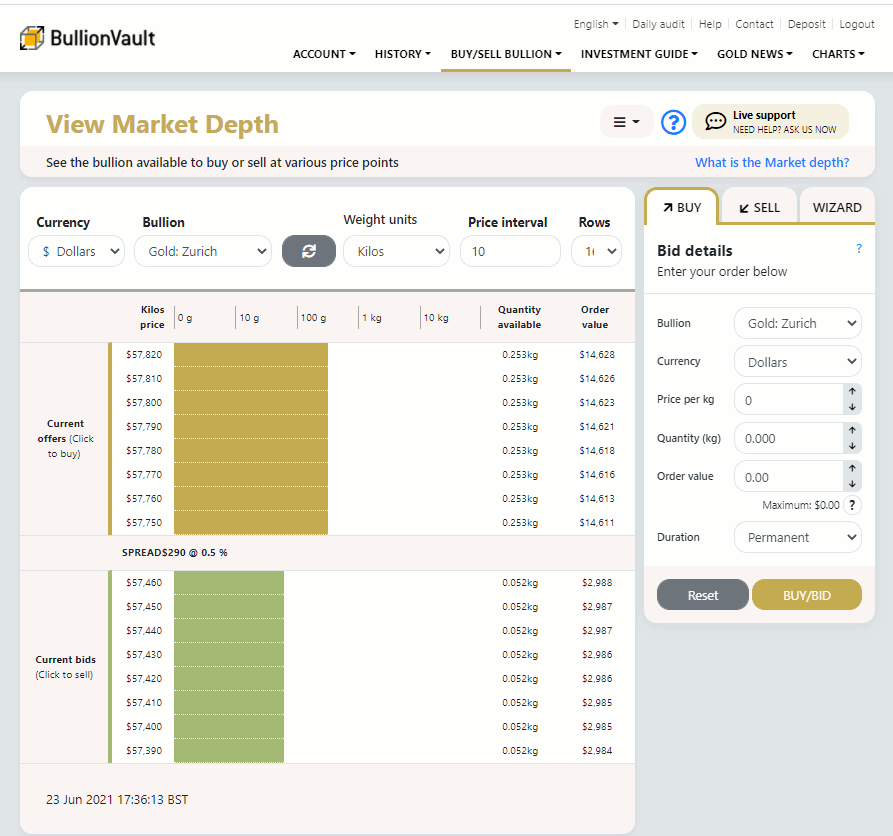
Some people use the market depth screen as an indicator of future price movements.
Get there by pressing MARKETS and then clicking MARKET DEPTH sub-menu option.

A deeper market is one in which you can buy or sell more gold. The longer the yellow lines the more gold there is about hoping to be bought. The longer the green lines the more cash there is about, chasing gold.
The most competitive prices are only available for a limited quantity of gold, next to the middle grey line on the screen. As the terms improve for your prospective counterparties the quantity of gold you can trade (the depth) increases too. In other words if you'll pay a bit more you can buy more gold and if you'll accept a bit less you can sell more gold.
Pay particular attention to the cumulative and logarithmic scales of this graphic.
This view can be a useful indicator of likely future price moves. The current price is what you can trade at now, but if this chart is predominantly gold it shows lots of gold being offered, and not much cash being offered. The market is awash with gold at the current price. The chances are that the green (cash) being offered by buyers will run out before the orange (bullion) being offered by sellers, indicating a likely price fall. Conversely if the graphic is predominantly green - indicating the market is awash with cash - the suggestion is that the price will rise. You must decide.
| Step 1. | Make sure you are logged in. Press MARKETS and then click the MARKET DEPTH sub-menu option. |
| Step 2. | You have to choose one currency and one vault. You do this from the drop down boxes at the upper left of your screen. You also need to specify a price interval and number of rows - which defines the sensitivity of the graphic. For US Dollars 20 is often a sensible price interval, and 16 is a good number of rows. |
| Step 3. | You might also choose to get a live price chart monitor running. Lots of gold prices from all over the world are fed into BullionVault's real-time price charts. These can give you a sniff of a potentially rising market and may offer a pattern which you think indicates a buying signal. |
| Step 4. | Now watch. Your order board screen will refresh itself every few seconds, or when you press the GO  button. |
| Step 5. | Spotted an opportunity? The race is on! Click the gold brick (or the green one), and the system will load what you've clicked straight into the order panel. Then press the SELL/OFFER (or BUY/BID ) , check and CONFIRM . Then look below for what happens next. |
© BullionVault.com 2012 - Buy gold online at live gold prices.